Latest Updates
How to Suspend and Unsuspend Accounts in WHM
How to Suspend and Unsuspend Accounts in WHM Managing hosting accounts is one of the most important responsibilities for hosting providers and resellers. Whether you are handling overdue payments, excessive resource usage, or policy…

How to Suspend and Unsuspend Accounts in WHM
Managing hosting accounts is one of the most important responsibilities for hosting providers and resellers. Whether you are handling overdue payments, excessive resource usage, or policy violations, WHM (Web Host Manager) provides powerful tools that allow you to suspend and unsuspend hosting accounts quickly and efficiently.
Account suspension is a temporary action that disables access to a hosting account without permanently deleting any data. This gives administrators the flexibility to address issues while preserving websites, databases, emails, and account settings.
In this guide, you’ll learn how to suspend and unsuspend accounts in WHM, view suspended accounts, customize suspension pages, and follow best practices for account management.
What Is Account Suspension in WHM?
Account suspension is a feature in WHM that temporarily disables a hosting account. When an account is suspended, the hosted website becomes inaccessible and visitors see a suspension notice instead of the website.
Unlike account termination, suspension does not remove files or data from the server. Everything remains intact, allowing the account to be restored easily once the issue has been resolved.
Suspension is commonly used by hosting providers as a preventive measure before taking more serious actions such as account termination.
What Happens When an Account Is Suspended?
When you suspend an account in WHM:
- The website becomes unavailable.
- Visitors see a suspended account page.
- cPanel access is disabled.
- FTP access is blocked.
- SSH access is disabled.
- Email functionality may be restricted depending on server settings.
- All account data remains safely stored on the server.
This makes suspension a safe and reversible administrative action.
How to Suspend an Account in WHM
Suspending an account in WHM is a straightforward process.
Step 1: Log in to WHM
Start by accessing your WHM dashboard.
Common WHM login URLs include:
Enter your WHM username and password to log in.
Once authenticated, you will be directed to the WHM home page where all server management tools are available.
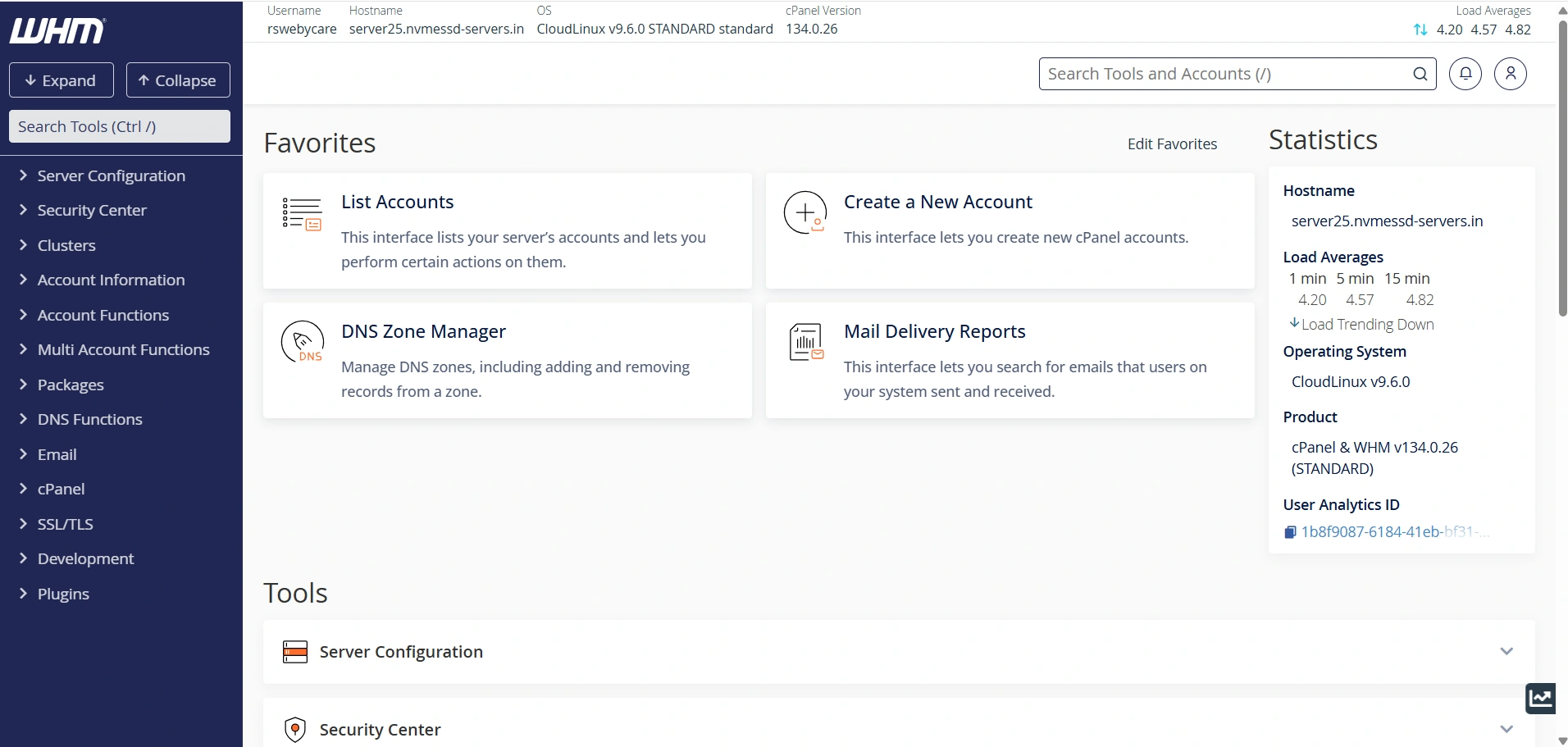
Step 2: Open the Suspension Manager
In the WHM search box located on the left side:
- Type Suspension.
- Click Manage Account Suspension.
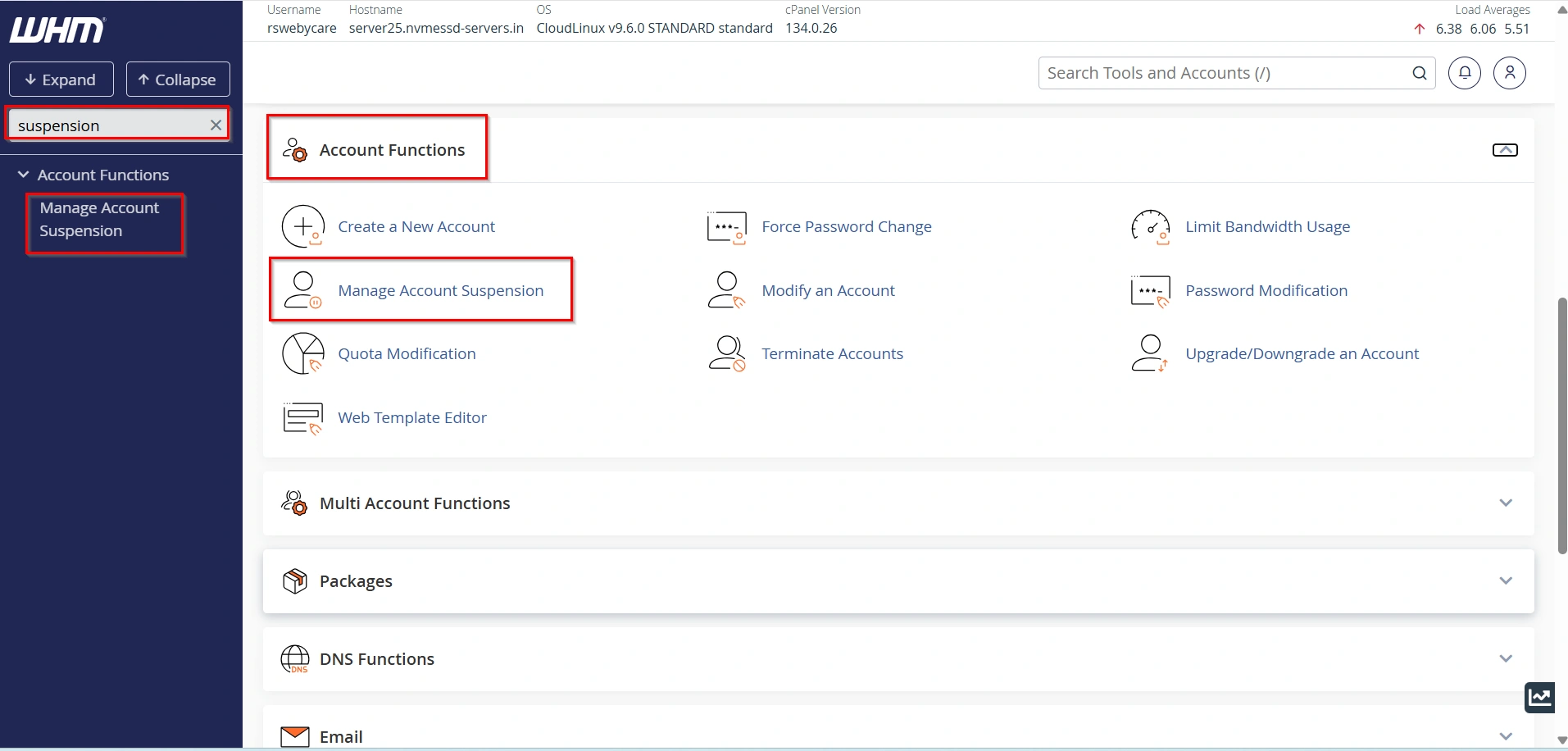
Step 3: Select the Account
Choose the hosting account you want to suspend from the list of available accounts.
- Click on Continue
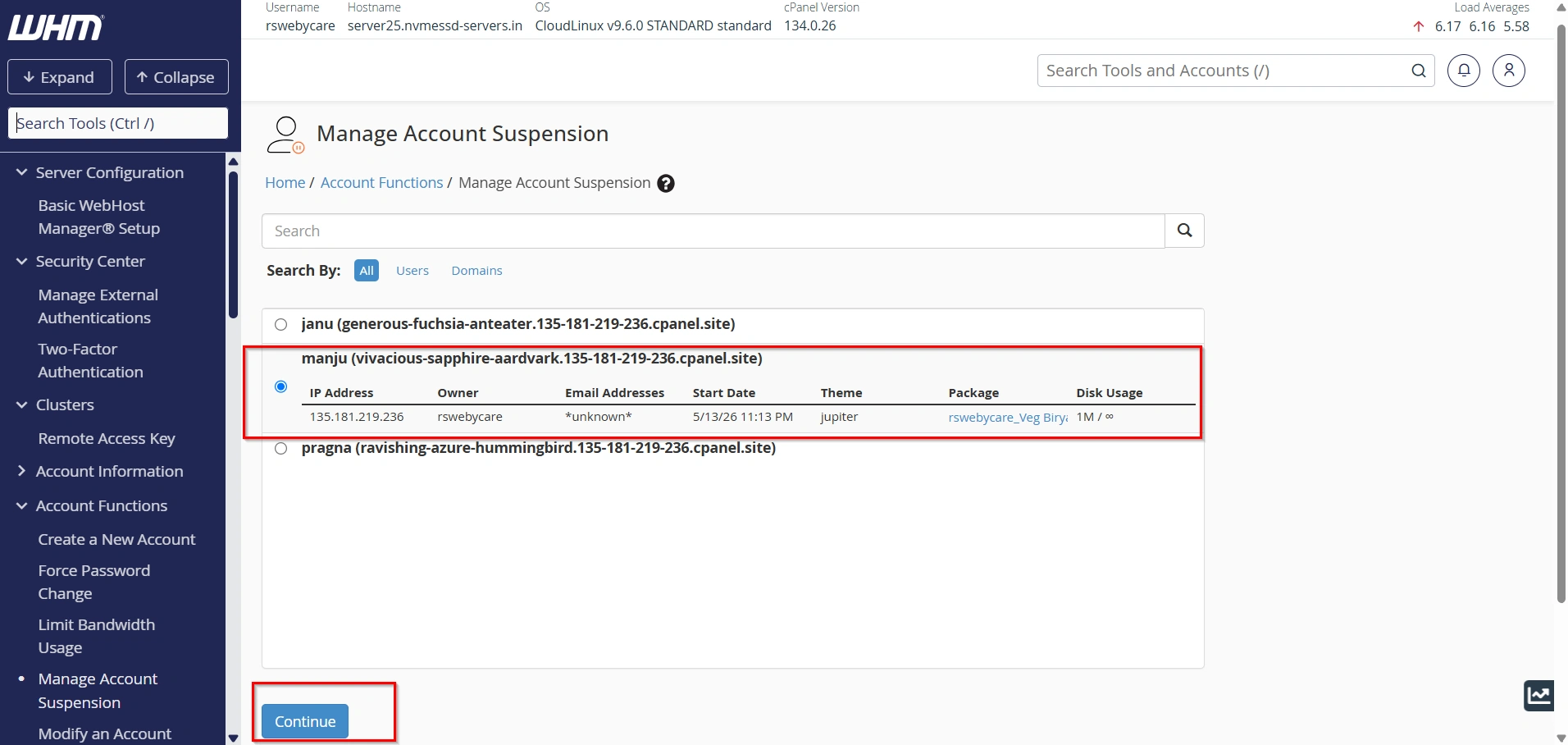
Step 4: Enter a Suspension Reason
WHM allows administrators to record a reason for the suspension.
Examples include:
- Payment overdue
- Bandwidth exceeded
- Security investigation
- Abuse complaint received
Providing a clear reason helps maintain accurate records and simplifies future account reviews.
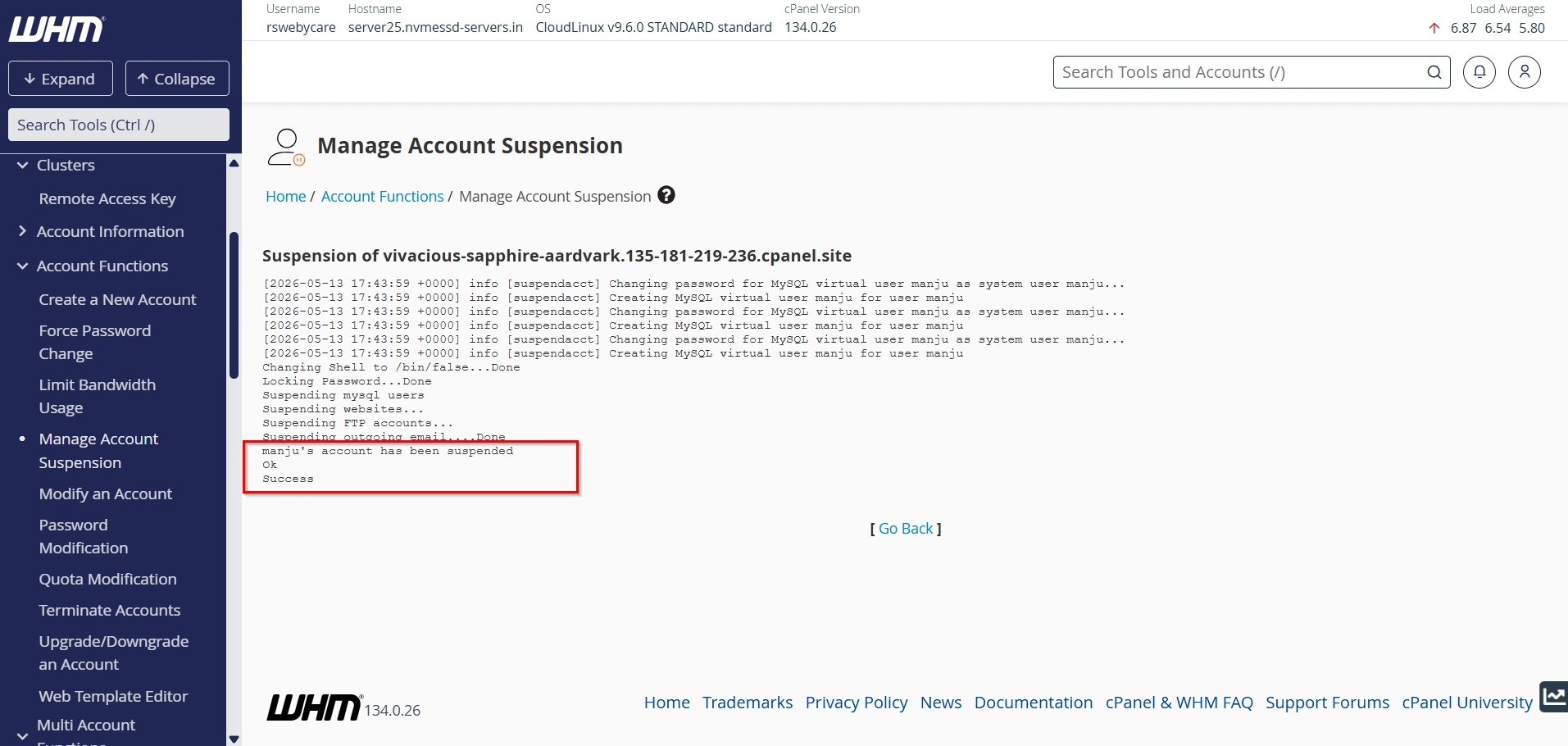
- Click on Suspend button.
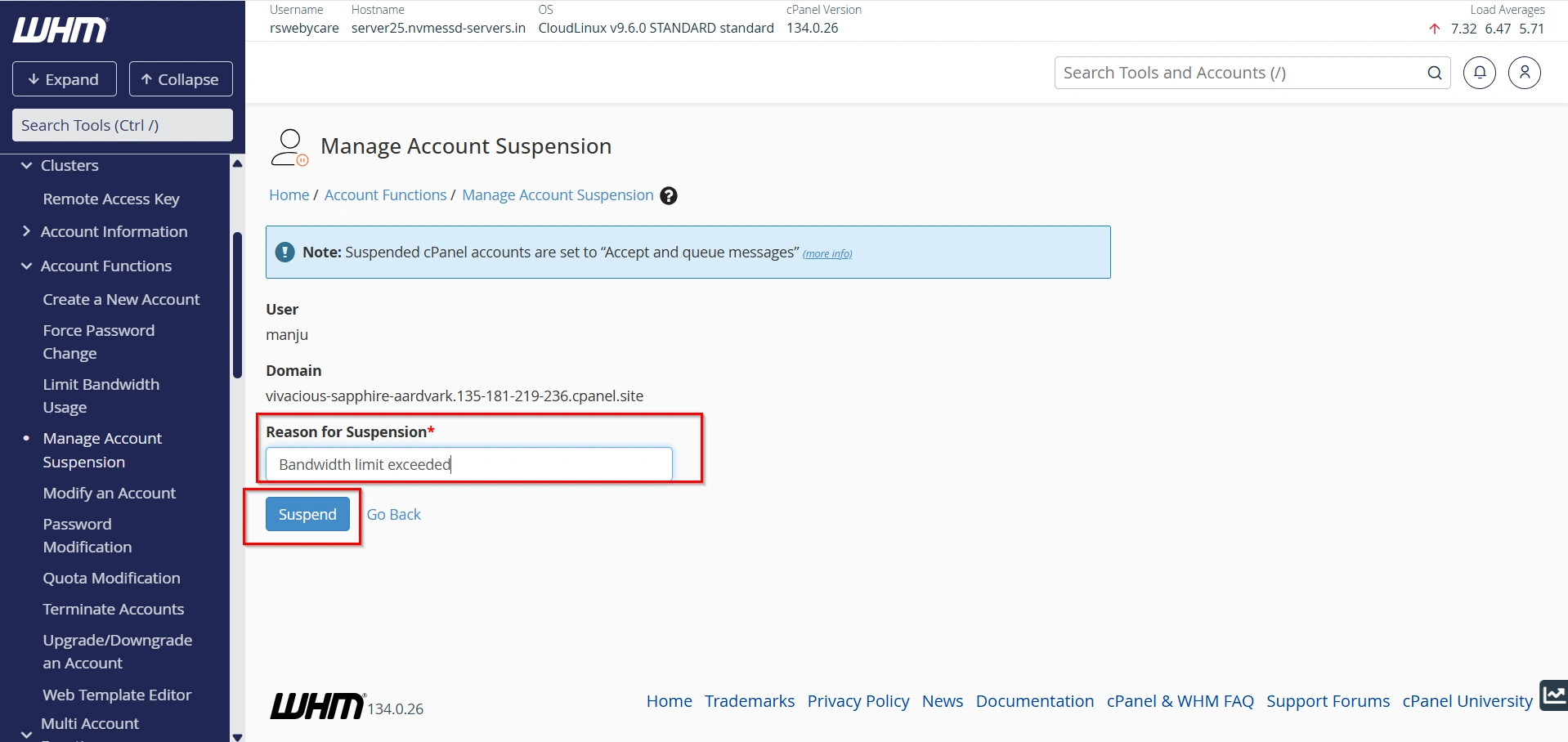
- WHM will immediately suspend the account and display a confirmation message.
- The website will no longer be accessible, and visitors will see the suspension notice page.
How to Unsuspend an Account in WHM
Once the customer resolves the issue, the account can be restored within seconds.
Step 1: Access Manage Account Suspension
- Log in to WHM
2. Use the search box.
3. Type Suspension.
4. Select Manage Account Suspension.
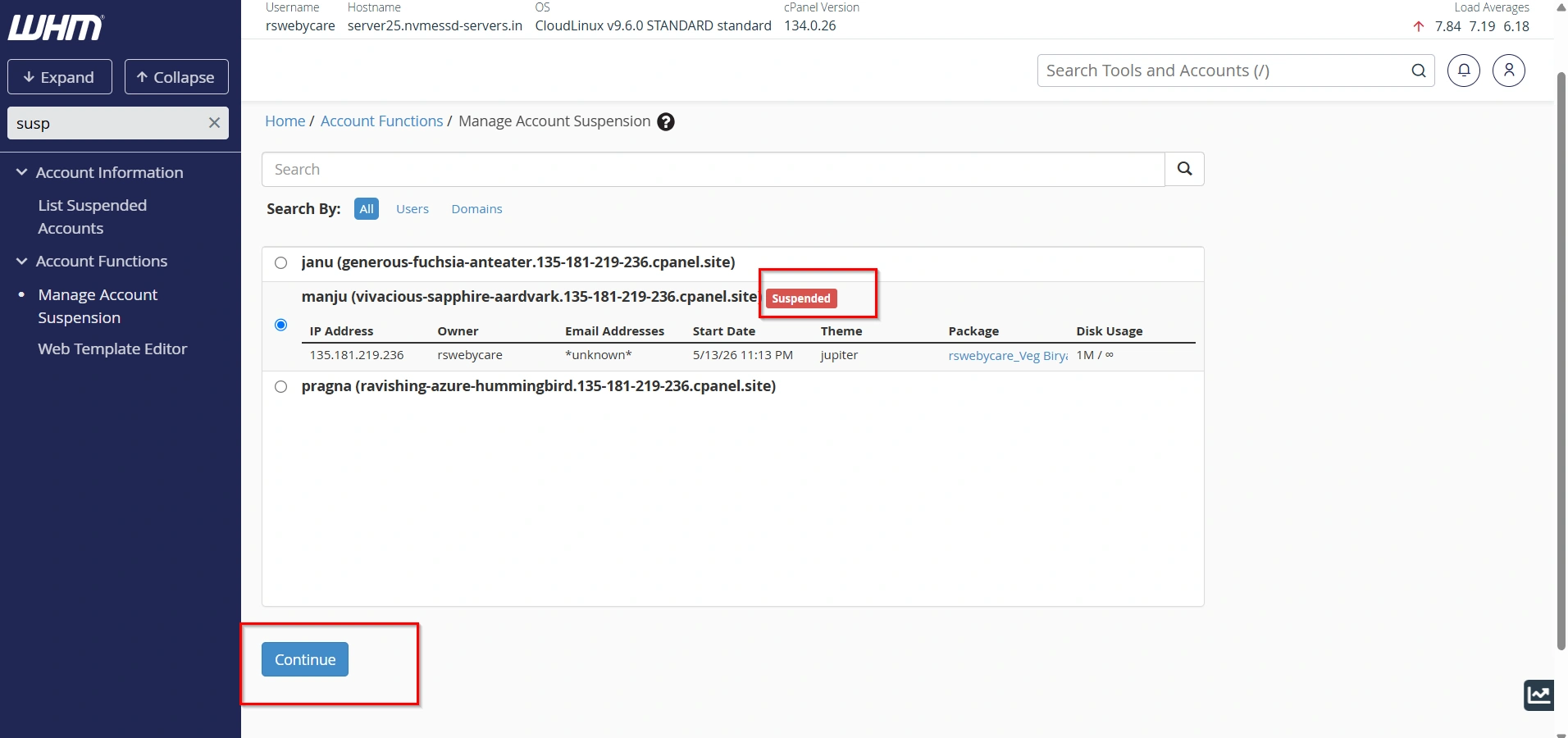
Step 2: Locate the Suspended Account
Suspended accounts are typically highlighted in red, making them easy to identify.
- Click on Continue
Step 3: Unsuspend the Account
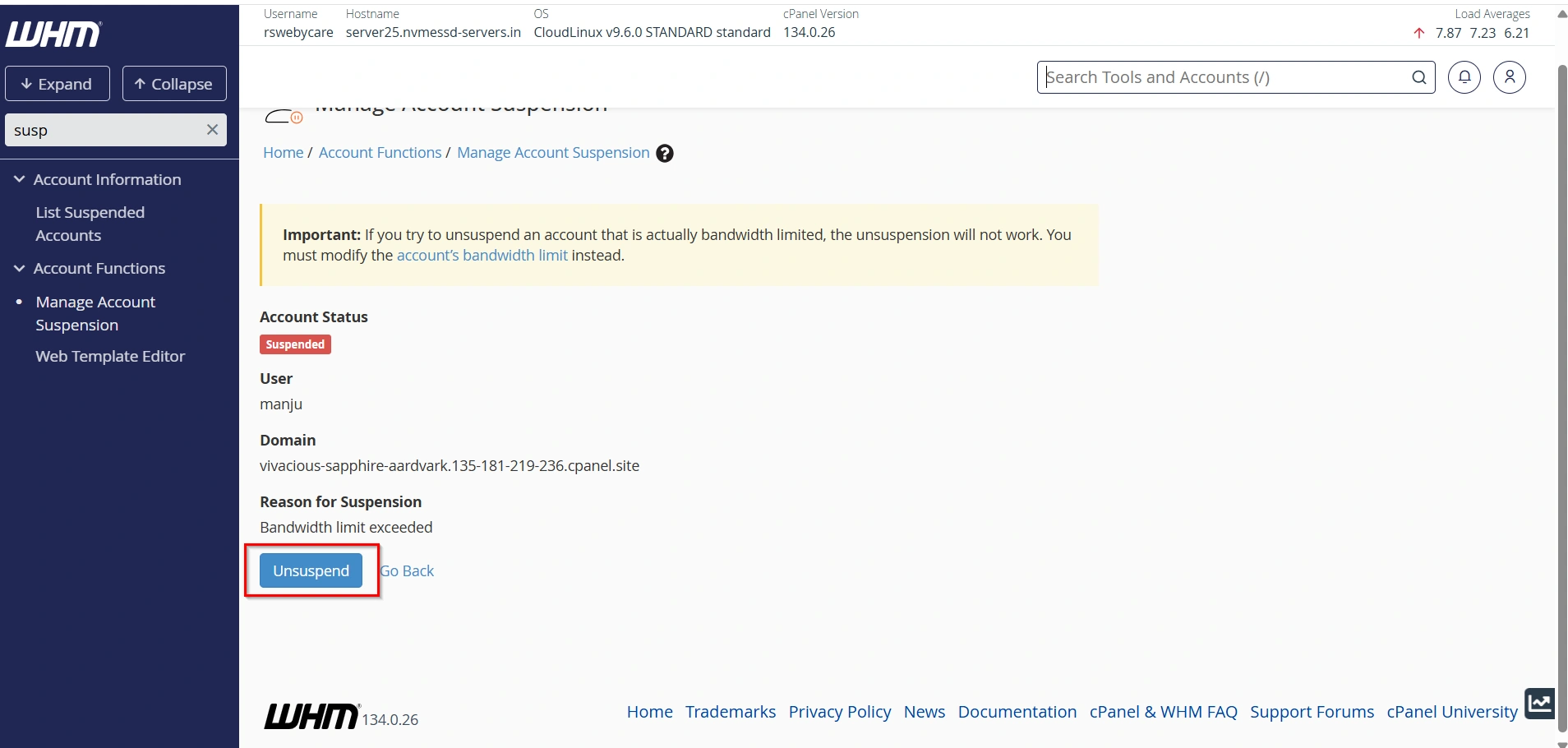
Select the suspended account and click Unsuspend.
WHM will instantly restore:
- Website access
- cPanel login
- FTP connectivity
- SSH access (if enabled)
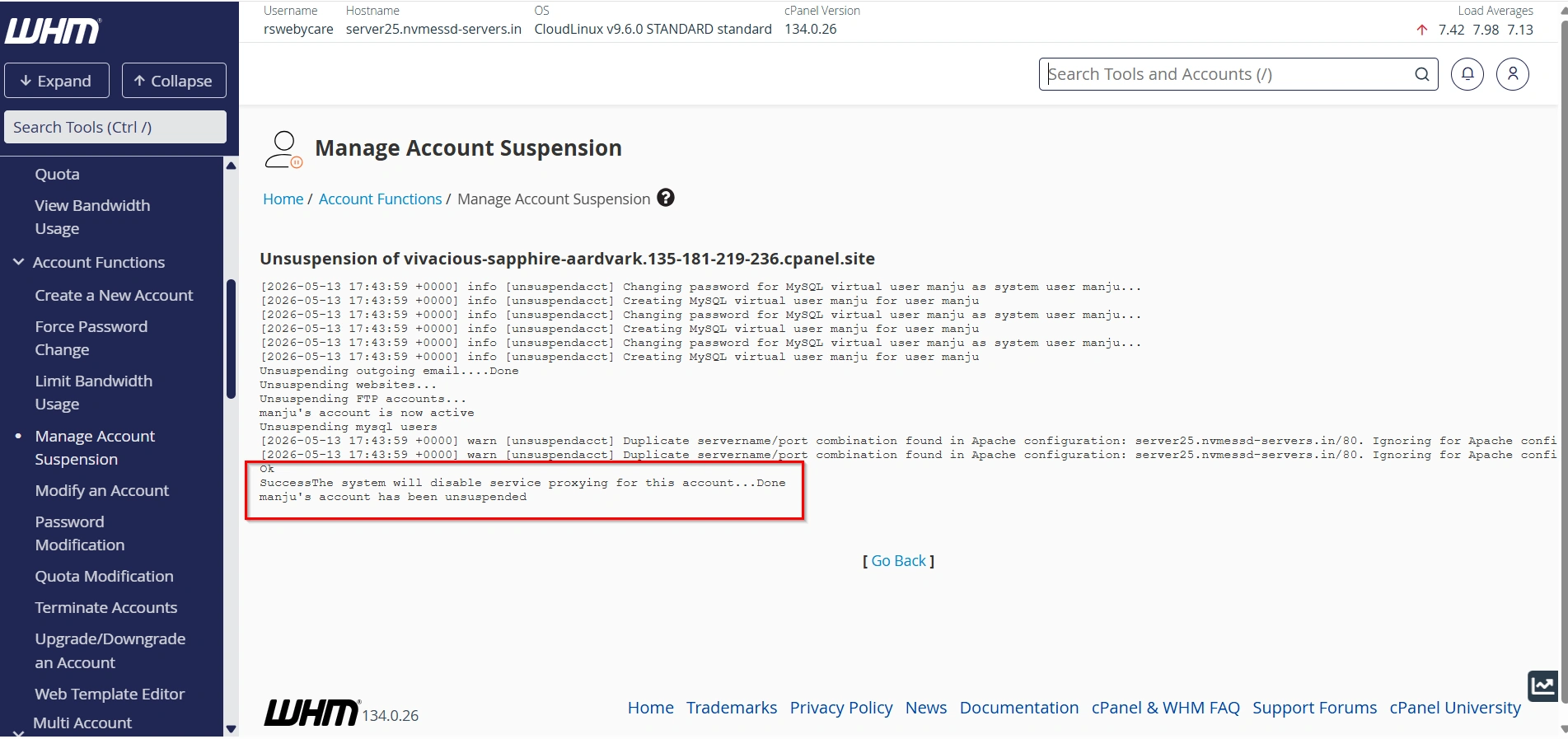
The account will return to normal operation without affecting existing data.
How to View Suspended Accounts in WHM
WHM includes a dedicated interface for monitoring suspended accounts.
Steps to View Suspended Accounts
- Log in to WHM.
- Enter Suspension in the search field.
- Click Account Information.
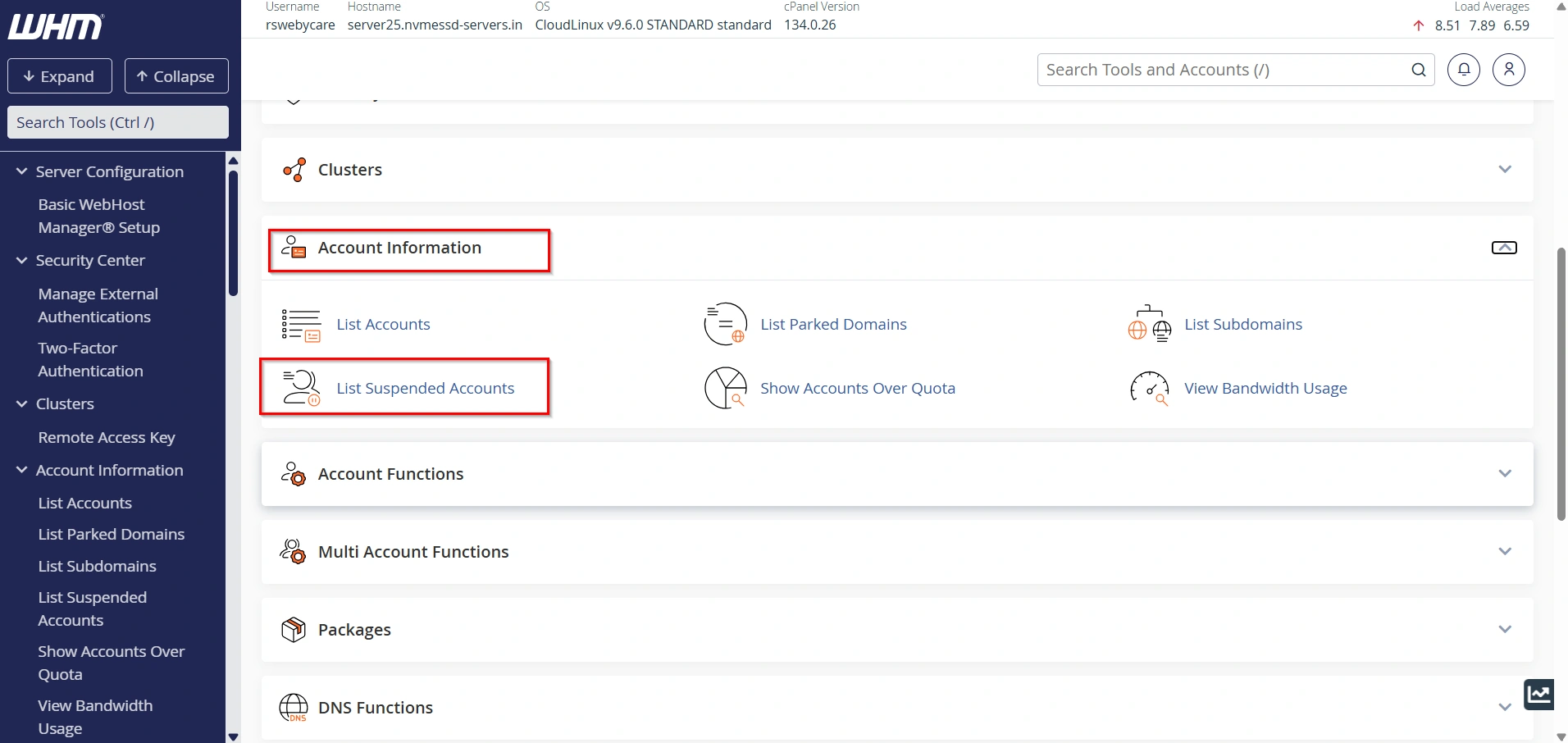
This page displays all suspended accounts on the server, helping administrators quickly review account status and determine which accounts require attention.
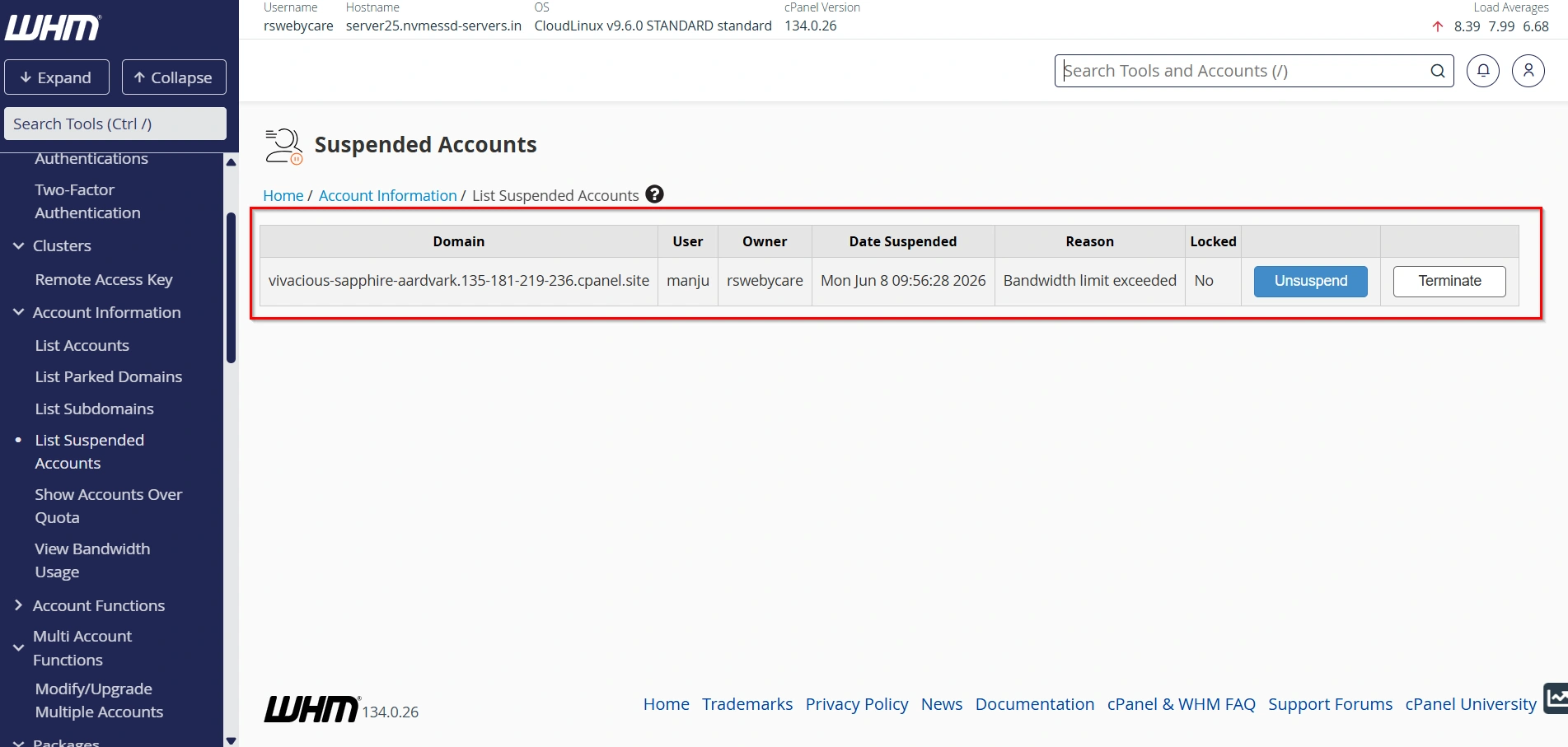
Regularly reviewing suspended accounts can help maintain an organized hosting environment.
Common Reasons to Suspend an Account
There are several situations where suspending a hosting account may be necessary.
1. Overdue Payments
One of the most common reasons for suspension is unpaid invoices. Hosting providers often suspend accounts when customers fail to renew their services or pay their monthly hosting fees.
2. Bandwidth Limit Exceeded
If a website exceeds its allocated bandwidth limit, it may consume excessive server resources. Suspending the account helps prevent performance issues for other users on the server.
3. Terms of Service Violations
Accounts that engage in prohibited activities such as spam, phishing, malware distribution, or illegal content may need immediate suspension to protect the server and other customers.
4. Security Threats
If an account is compromised by hackers or malware, temporary suspension can help prevent further damage while investigations and cleanup procedures are performed.
5. Resource Abuse
Websites consuming excessive CPU, memory, or disk I/O resources can negatively impact server performance. Suspending the account may be necessary until resource usage is optimized.
Best Practices for Account Suspensions
To ensure smooth account management, consider these best practices:
- Always provide a clear suspension reason.
- Notify customers before suspension whenever possible.
- Keep detailed records of suspension actions.
- Review suspended accounts regularly.
- Use customized suspension pages that include support contact information.
- Resolve billing and compliance issues promptly to minimize downtime.
Conclusion
WHM provides a simple yet powerful system for suspending and unsuspending hosting accounts. Whether you’re dealing with unpaid invoices, bandwidth overages, security threats, or policy violations, account suspension allows you to protect your server while preserving customer data.
By understanding how to manage suspended accounts, monitor account status, and customize suspension pages, hosting providers and resellers can maintain a secure, organized, and professional hosting environment. Proper use of WHM’s suspension tools helps ensure server stability, improve customer communication, and streamline hosting account administration.
For more WHM management tutorials and step-by-step guides, visit our WHM knowledge base: www.webystrata.com/blog/category/whm-panel/
Related Articles