Latest Updates
How to Search Accounts in WHM
How to Search Accounts in WHM Managing multiple hosting accounts efficiently is one of the most important responsibilities of a hosting administrator or reseller. As the number of websites and clients grows, locating a…
How to Search Accounts in WHM
Managing multiple hosting accounts efficiently is one of the most important responsibilities of a hosting administrator or reseller. As the number of websites and clients grows, locating a specific hosting account quickly becomes essential for performing administrative tasks such as password resets, account modifications, package upgrades, DNS management, and troubleshooting.
Fortunately, WHM (Web Host Manager) provides powerful account search functionality that allows administrators to find hosting accounts using various criteria, including domain names, usernames, account owners, and IP addresses.
In this comprehensive guide, you’ll learn how to search accounts in WHM, why this feature is important, and how to use it effectively to streamline hosting account management.
What Is Account Search in WHM?
Account Search is a built-in feature in WHM that helps administrators and resellers quickly locate hosting accounts on a server.
Instead of manually scrolling through long lists of accounts, WHM allows you to search and filter results based on specific account details. This functionality is particularly useful when managing multiple websites or providing customer support.
Prerequisites
Before searching for accounts in WHM, ensure that:
- You have access to WHM.
- Your reseller or administrator account has permission to view hosting accounts.
- The account you are searching for exists on the server.
- You know at least one identifying detail, such as the domain name, username, or IP address.
How to Search Accounts in WHM
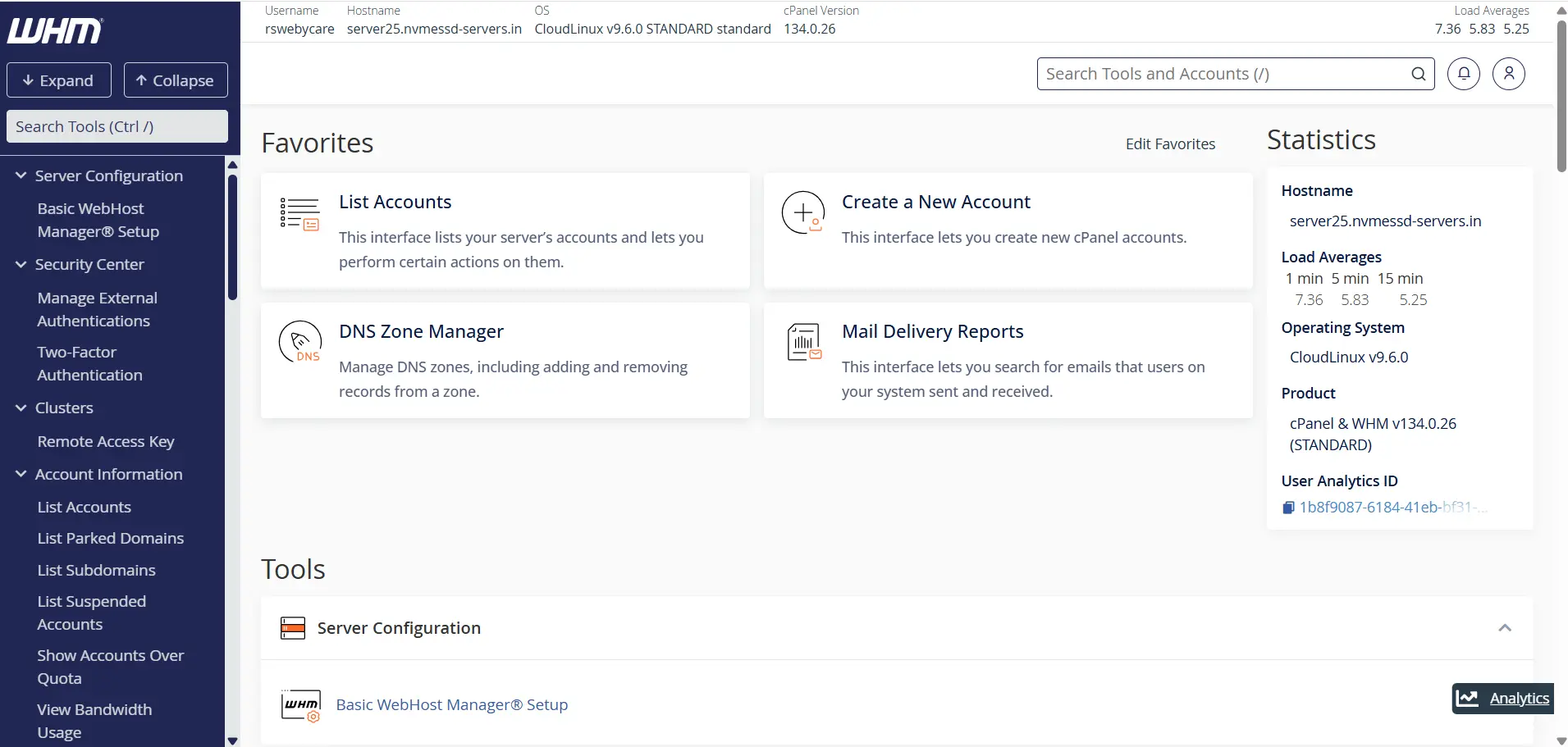
Step 1: Log in to WHM
Start by accessing your WHM dashboard.
Common WHM login URLs include:
Enter your WHM username and password to log in.
Once authenticated, you will be directed to the WHM home page where all server management tools are available.
Step 2: Locate the WHM Search Bar
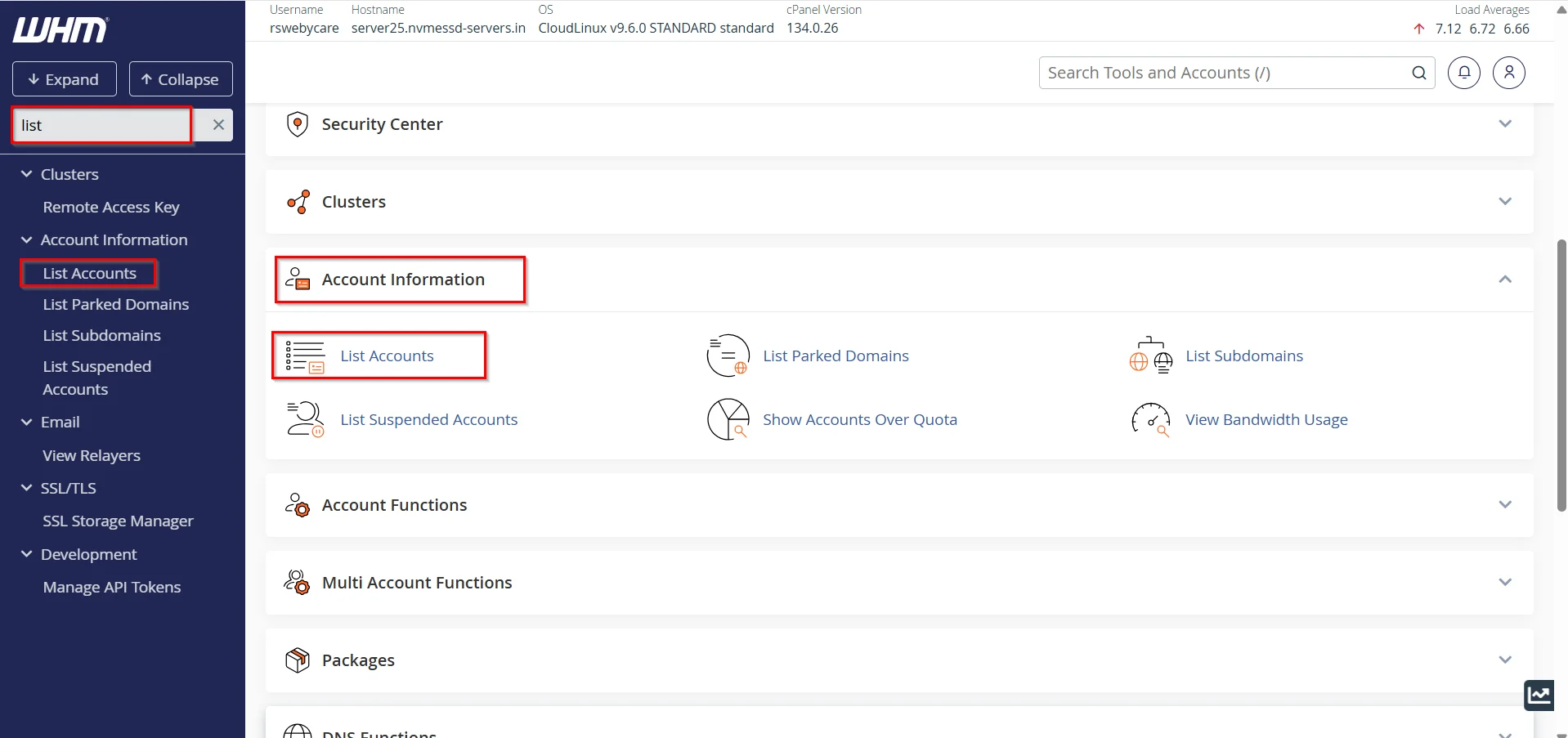
WHM includes a search box located at the top of the left navigation panel.
This search bar allows you to quickly find tools and management features within WHM.
Type:
List Accounts
Under the Account Information section, click:
List Accounts
The List Accounts interface displays all hosting accounts available under your permissions.
Understanding the List Accounts Page
The List Accounts page provides valuable information about each hosting account, including:
- Domain Name
- Username
- Account Owner
- Hosting Package
- IP Address
- Disk Usage
- Status Information
This overview makes it easy to identify and manage hosting accounts.
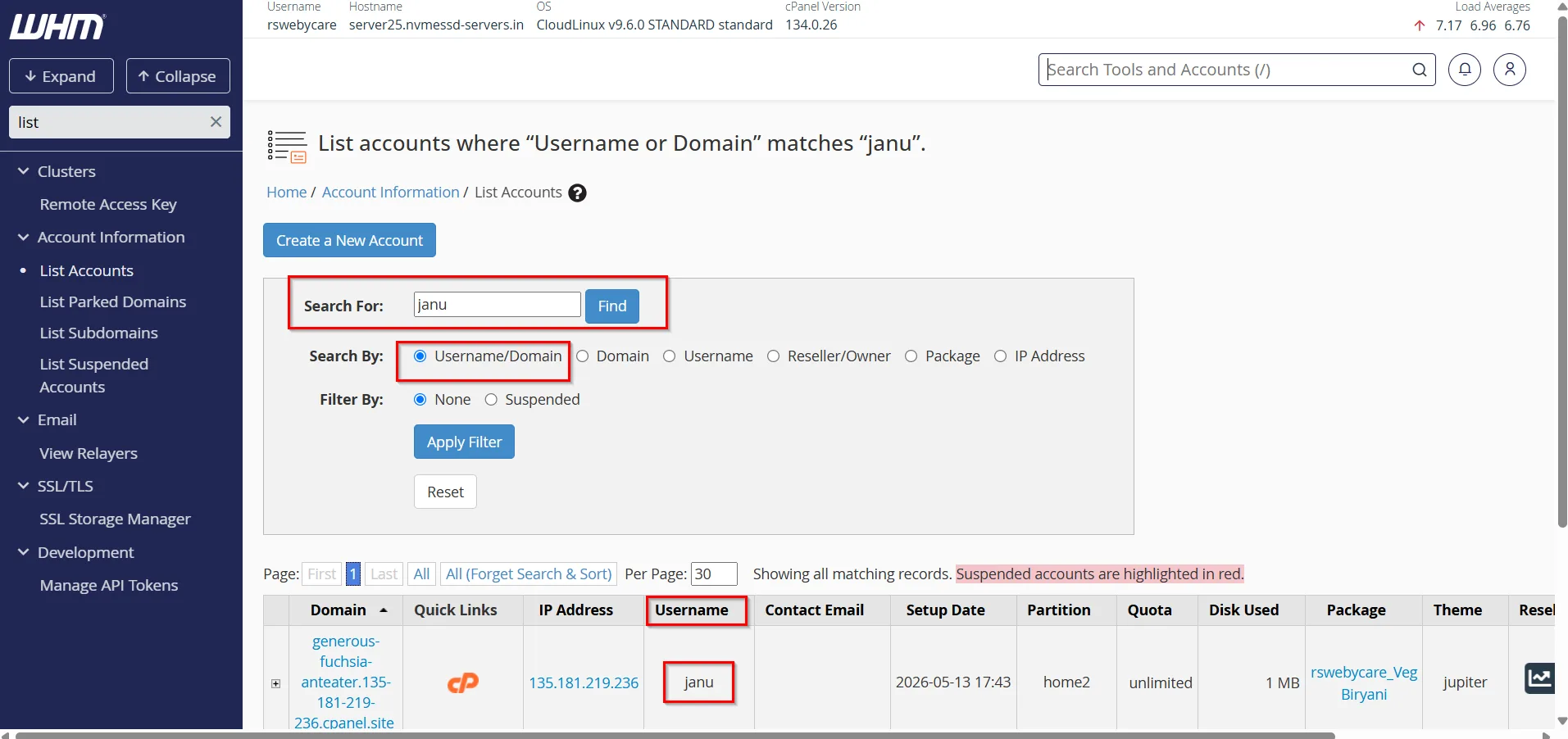
Step 3: Searching by Domain Name/ User Name
The most common method of locating an account is by searching for the domain name.
Example
Suppose you manage the following domains:
- example.com
- mybusiness.com
- onlineportal.net
Searching by Username
Every hosting account has a unique username assigned during account creation.
Example
Usernames may look like:
- john123
- webadmin
- client01
To search by username:
- Enter the username into the search field.
- WHM displays the corresponding account.
Searching by username is particularly useful when working directly with hosting account credentials.
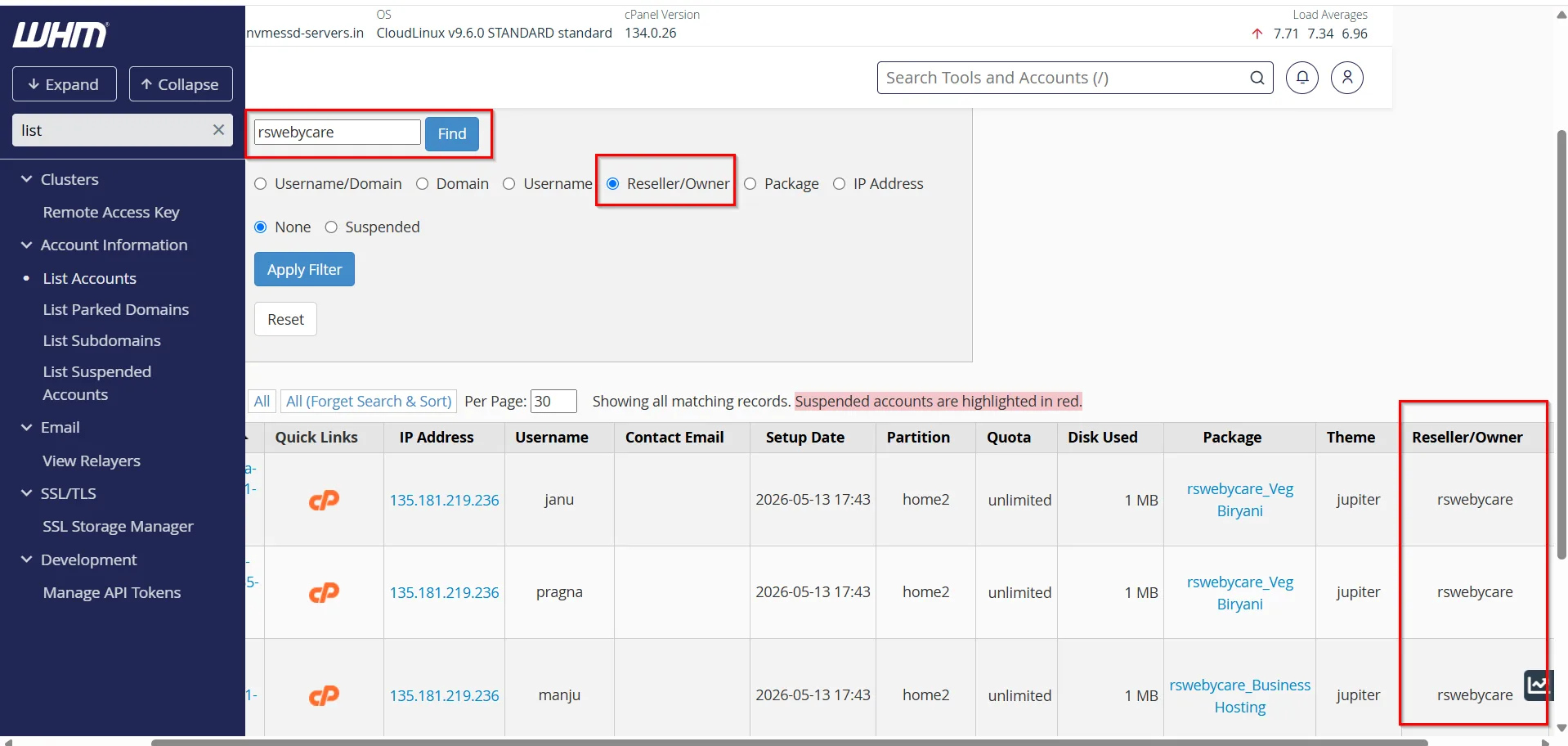
Step 4: Searching by Account Owner
Resellers often manage multiple hosting accounts under their ownership.
If you need to locate accounts associated with a particular reseller:
- Enter the reseller username.
- WHM filters the account list.
- Matching accounts appear instantly.
This feature simplifies account organization and reseller management.
Step 5: Searching by IP Address
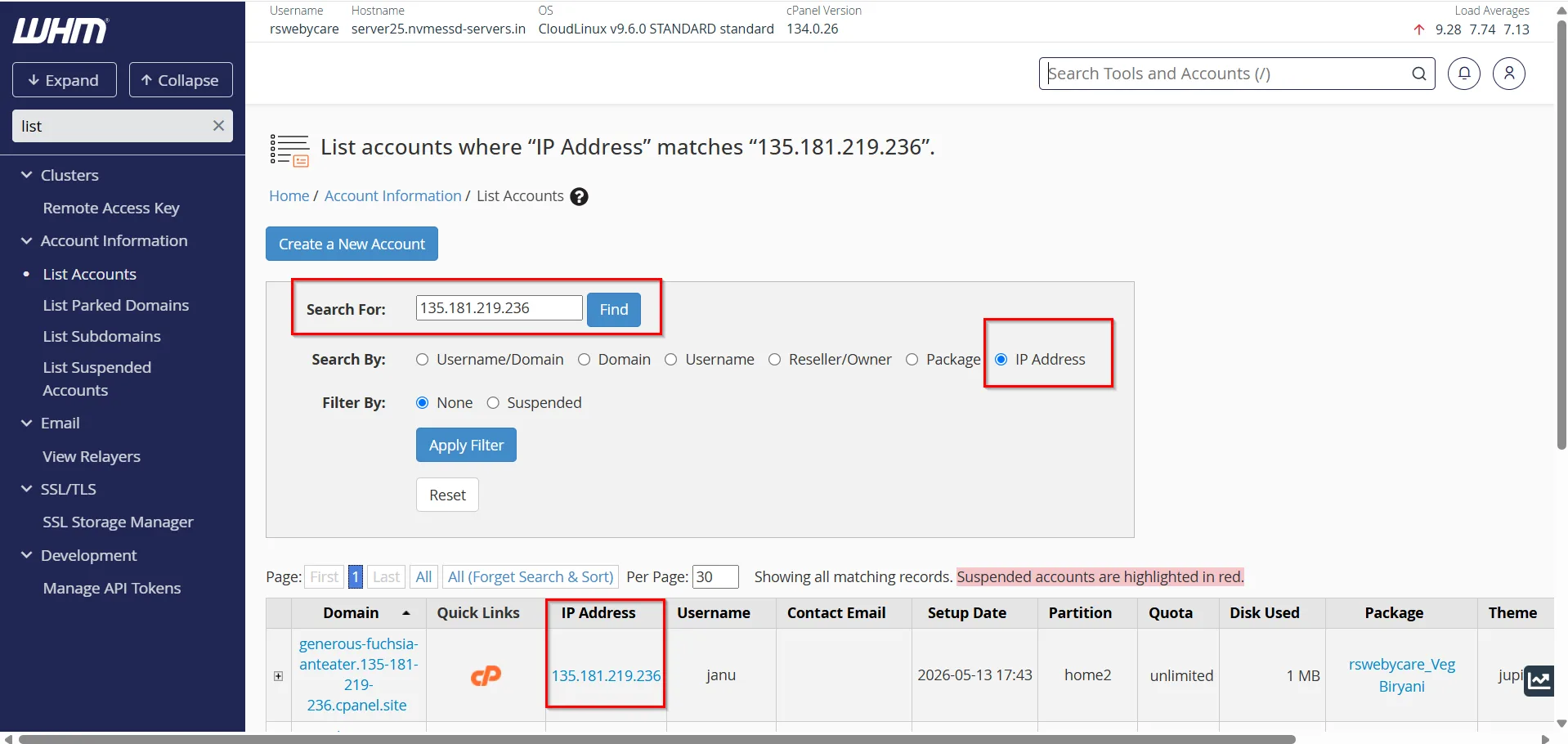
In some situations, administrators need to identify which account is using a specific IP address.
Examples include:
- SSL troubleshooting
- Website migration
- DNS issues
- Server diagnostics
To search by IP:
- Enter the server IP address into the search field.
- WHM displays any matching accounts.
This helps identify the domain associated with a particular IP.
Step 6: Viewing Account Details
After locating the account, review important information such as:
- Domain Name
-
Username
-
Package
-
Disk Usage
-
IP Address
-
Account Owner
Common Tasks After Finding an Account
Once you’ve located the desired account, WHM allows you to perform various management tasks.
- Modify an Account
- Change Passwords
- Upgrade or Downgrade Packages
- Suspend or Unsuspend Accounts
- View Bandwidth Usage
- Manage DNS Settings
Why Account Search Is Important
Efficient account management is essential for maintaining a reliable hosting environment. As the number of hosted websites grows, the ability to locate accounts quickly becomes increasingly valuable.
WHM’s account search functionality improves productivity, reduces administrative effort, and helps support teams resolve customer issues more effectively.
Whether you’re managing a handful of websites or hundreds of hosting accounts, mastering account search is a fundamental WHM skill.
Why Search Accounts in WHM?
Searching for accounts is one of the most frequently performed tasks in WHM because it allows administrators to:
- Locate hosting accounts instantly
- Find domains associated with specific users
- Verify account ownership
- Identify assigned hosting packages
- View account resource usage
- Troubleshoot website and email issues
- Perform account modifications efficiently
Without a search function, managing large hosting environments would become time-consuming and inefficient.
Benefits of Using the Account Search Feature
- Faster Account Management
- Improved Productivity
- Better Customer Support
- Simplified Troubleshooting
- Enhanced Organization
Conclusion
Searching accounts in WHM is a simple yet powerful feature that allows hosting administrators and resellers to quickly locate domains, usernames, IP addresses, and account information. By leveraging WHM’s built-in search tools, you can streamline account management, improve customer support, and perform administrative tasks more efficiently.
Regular use of the account search feature will save time, improve organization, and make managing your hosting environment significantly easier. As your hosting business grows, effective account management becomes increasingly important, making this feature one of the most valuable tools available in WHM.
For more WHM management tutorials and step-by-step guides,
visit our WHM knowledge base: www.webystrata.com/blog/category/whm-panel/
Related Articles