cPanel
How to Create a Mailing List in cPanel
How to Create a Mailing List in cPanel Effective communication is essential for businesses, organizations, educational institutions, and online communities. When you need to send the same message to multiple people, manually entering every…

How to Create a Mailing List in cPanel
Effective communication is essential for businesses, organizations, educational institutions, and online communities. When you need to send the same message to multiple people, manually entering every recipient can be time-consuming and inefficient. This is where mailing lists become valuable.
cPanel provides a built-in Mailing Lists feature that allows website owners and administrators to create email distribution lists. A mailing list enables you to send a single email to multiple subscribers through one dedicated email address, making communication easier and more organized.
In this guide, you’ll learn what a mailing list is, why it’s useful, and how to create and manage a mailing list in cPanel.
What Is a Mailing List?
A mailing list is a specialized email address that automatically distributes incoming messages to all subscribed members.
For example, instead of sending an email separately to:
You can create a mailing list such as:
When you send a message to that mailing list address, all subscribed members receive the email automatically.
Prerequisites
Before creating a mailing list in cPanel, ensure that:
- You have access to your cPanel account.
- Email services are enabled on your hosting account.
- Your domain is properly configured.
- You have administrator access to manage email settings.
How to Create a Mailing List in cPanel
Follow these steps to create a mailing list.
Step 1: Login to cPanel from Client Area
First, visit the WebyStrata website and log in to your client area account using your registered email address and password.
official Website www.webystrata.com
After logging in:
- Go to Services
- Click on My Services
- Select your active hosting service
- Click on Login to cPanel

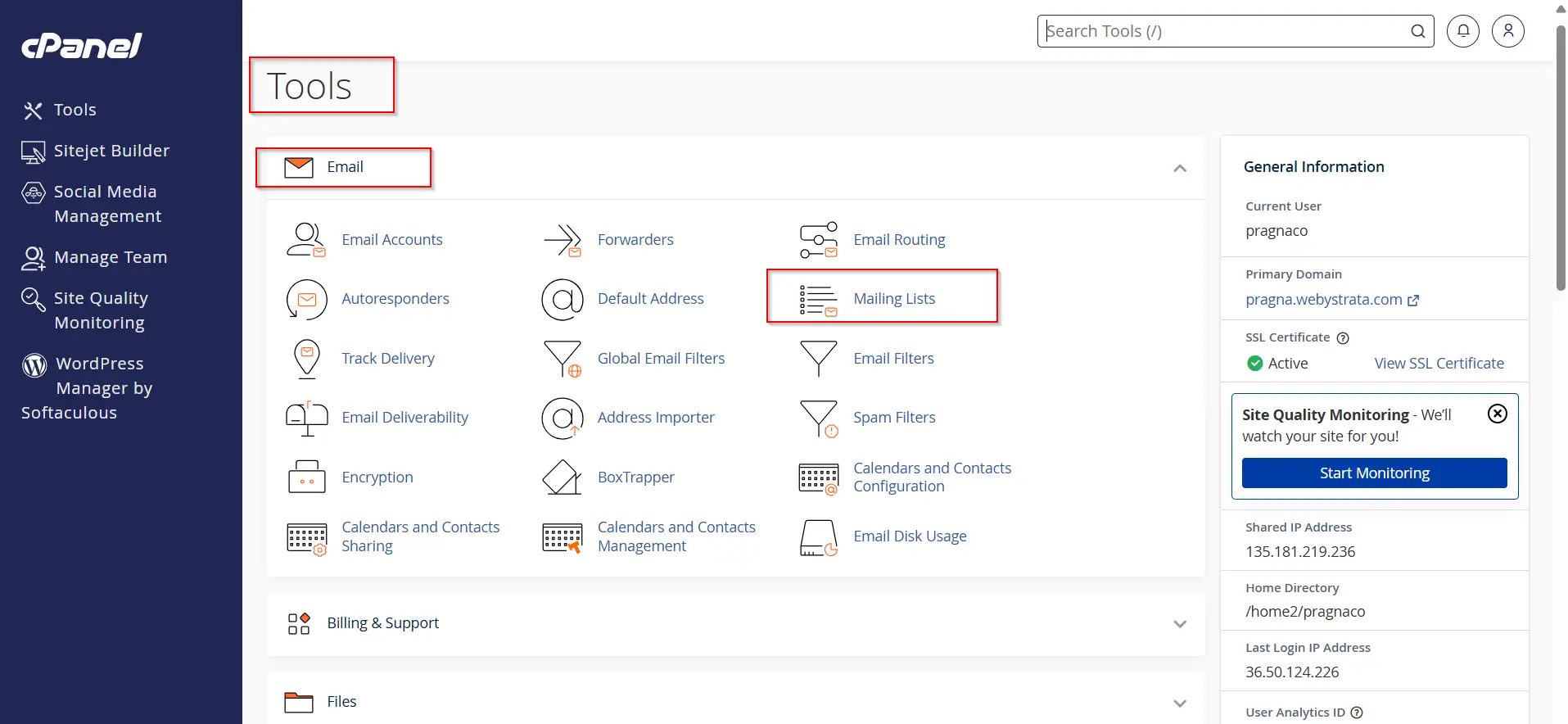
Step 2: Open the Mailing Lists Feature
- Navigate to the Email section.
- Click Mailing Lists.
The Mailing Lists interface will open.
Step 3: Create a New Mailing List
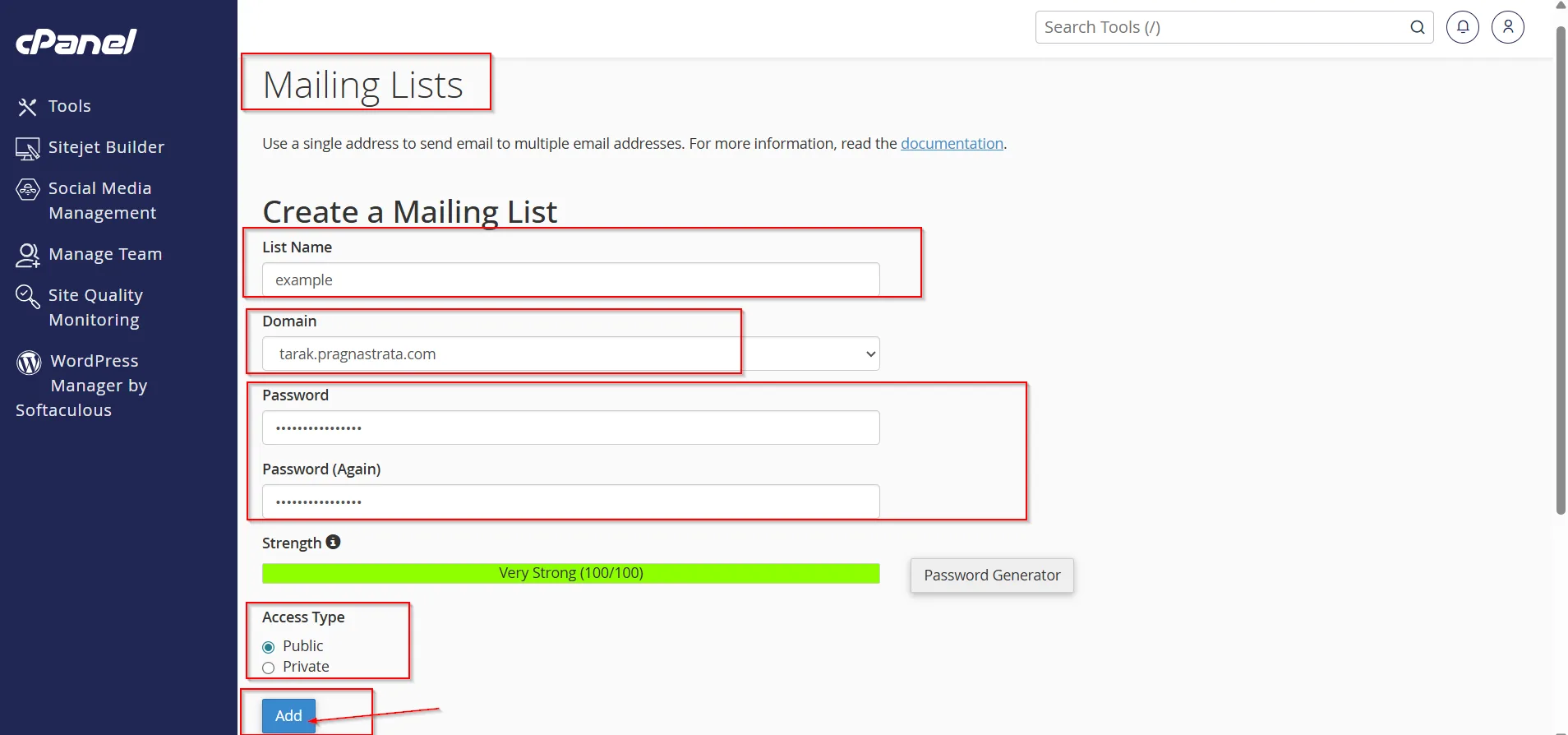
Under the Create a Mailing List section:
- Enter a name for the mailing list.
- Example:
newsletter - Example:
teamupdates
- Example:
- Select the domain associated with the mailing list.
- Set a password for the mailing list administrator.
- Confirm the password.
- Choose an access type if available.
- Click Add Mailing List.
Your mailing list will be created successfully.
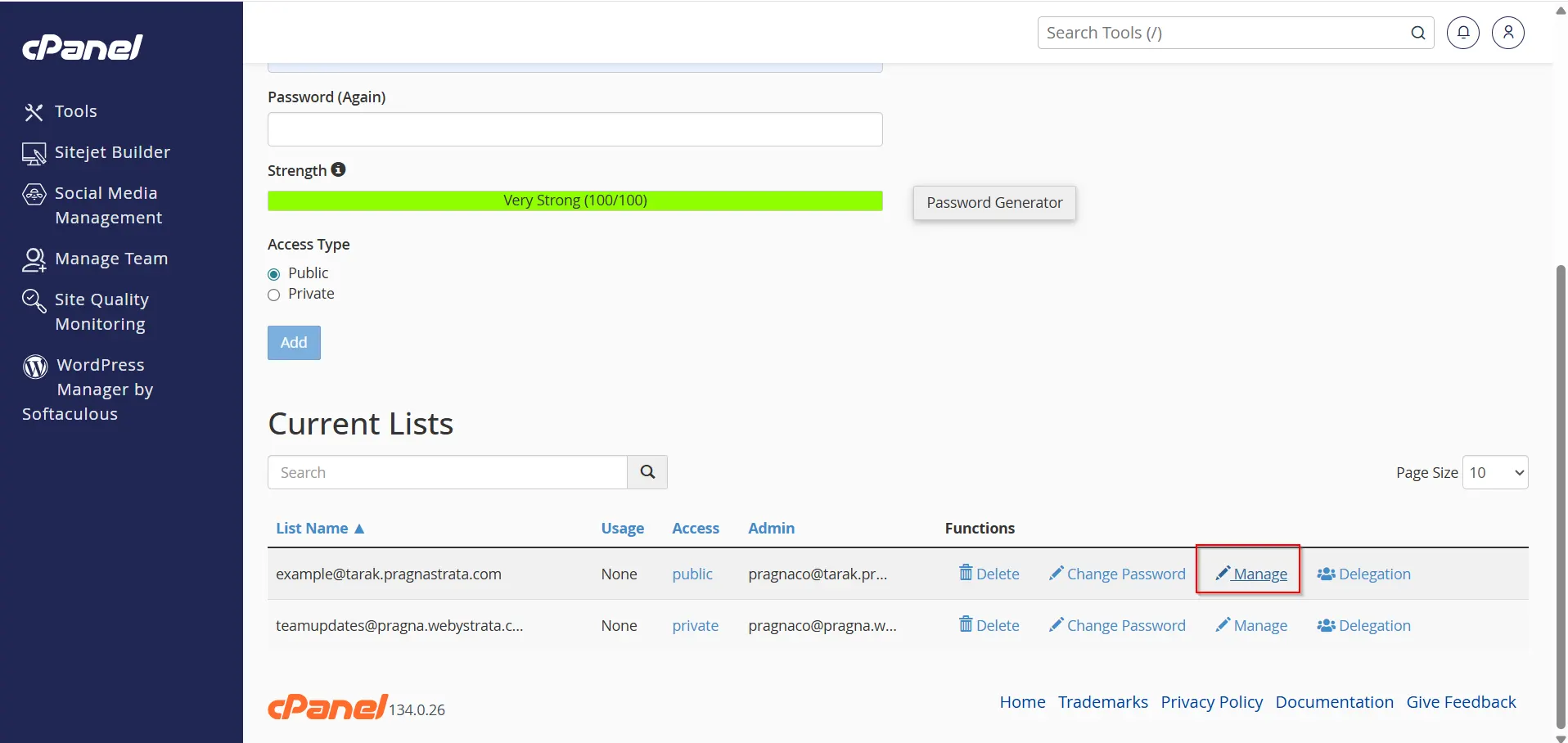
Step 4: Access the Mailing List Management Page
After creation, cPanel will display the mailing list details.
Click on Manage
Step 5: Add Subscribers
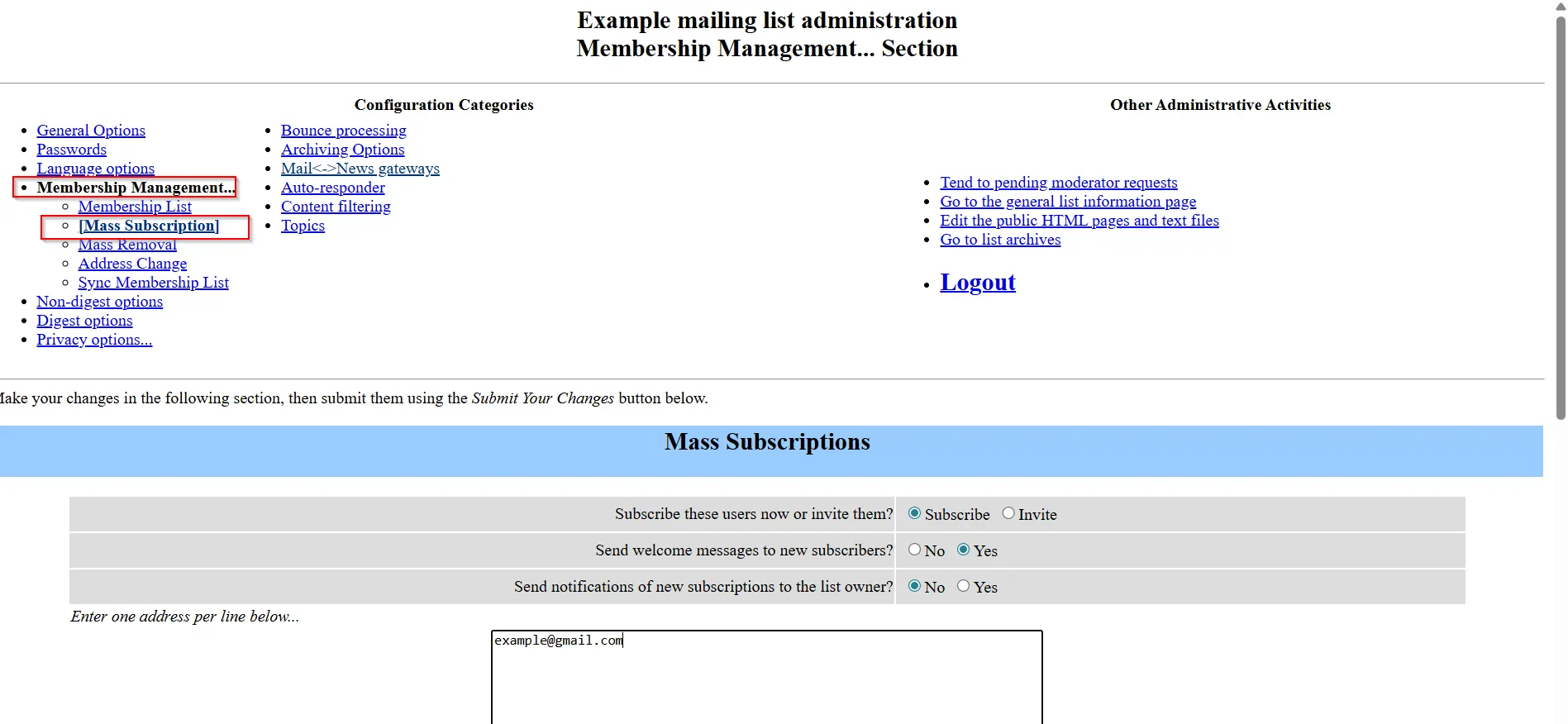
Inside the mailing list management panel:
- Locate the Membership Management section.
- Click on Mass Subscription.
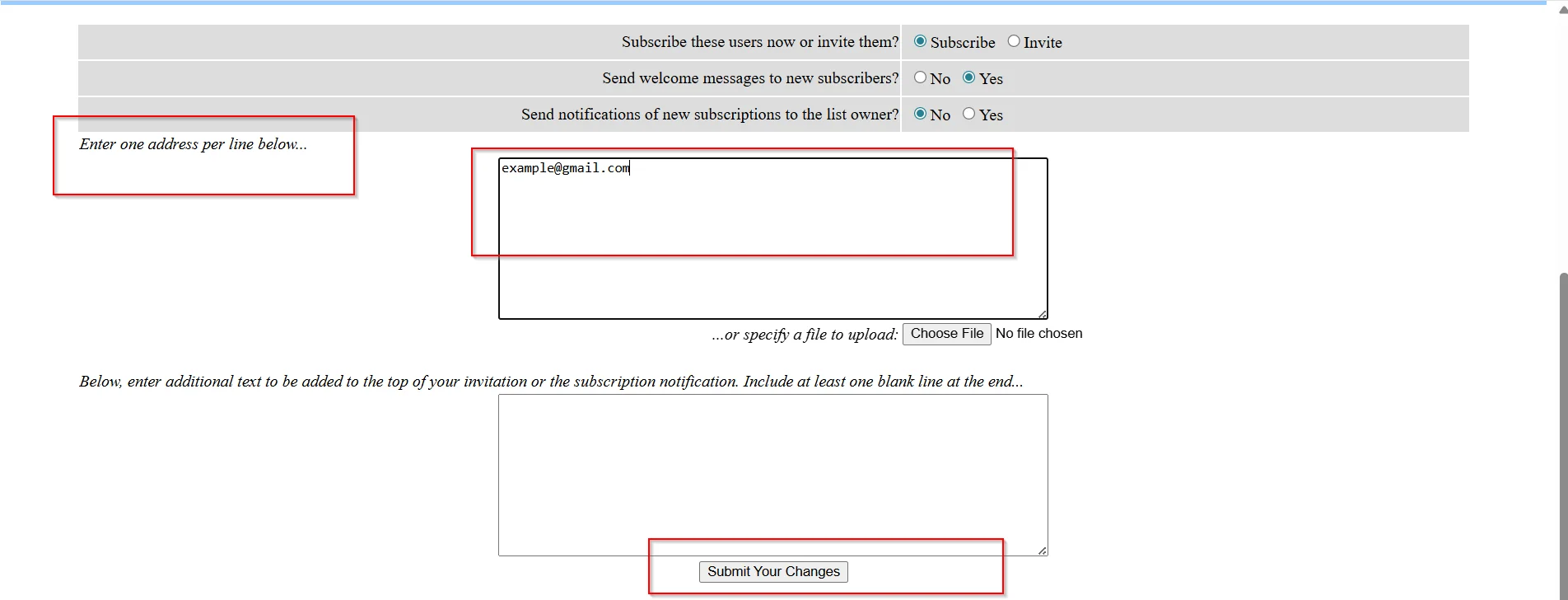
3. Add individual email addresses manually.
4. Submit Your Changes .
The subscribers will now receive messages sent to the mailing list address.
How to Send an Email to the Mailing List
Once your mailing list is configured:
- Open your preferred email client.
- For example, you can use Webmail, Outlook, Gmail, Thunderbird, or any email client authorized to send messages to the mailing list.
- Create a new email.
- Enter the mailing list address in the recipient field.
- Compose your message.
- Click Send.
The mailing list server will automatically distribute the message to all subscribed members.
Managing Your Mailing List
You can perform several administrative tasks, including:
- Add New Members
- Remove Subscribers
- Moderate Messages
- Configure Privacy Settings
- Update List Preferences
Benefits of Using a Mailing List
- Send emails to multiple recipients at once.
- Simplify team and customer communication.
- Manage subscriber groups efficiently.
- Reduce the time spent sending bulk messages.
- Useful for newsletters, announcements, and internal communications
Common Uses for Mailing Lists
Mailing lists can be used for:
- Business announcements
- Employee communications
- Customer newsletters
- Product updates
- Community groups
- School and university communications
- Technical support teams
- Marketing campaigns
- Event notifications
- Membership organizations
Conclusion
Creating a mailing list in cPanel is a practical way to communicate with multiple recipients through a single email address. Whether you are managing business announcements, customer updates, team communications, or newsletters, cPanel’s Mailing Lists feature simplifies the process and helps you maintain organized communication.
By following the steps outlined in this guide, you can successfully create a mailing list, add subscribers, manage permissions, and send emails efficiently. Regular maintenance and proper management will ensure your mailing list remains effective and reliable for long-term communication needs.
Related Articles